Player ESP
Player ESP
Choose which names and player details to display. Box and skeleton options add a visual reference.
- Player ESP
Our Aion 2 Cheats include player ESP with faction filters, soft aim and flight markers. Find gathering nodes and world bosses or use the separate 2D radar. Check the setup requirements and compare access plans before you buy.

PC
Steam / PURPLE
Windows
10 / 11
31
31 days or lifetime
Cloud DMA
Review features and requirements
Features
Choose which player details and world markers appear on screen. Our ESP and radar guide explains when labels in the game view or a separate map are useful.
Player ESP
Choose which names and player details to display. Box and skeleton options add a visual reference.
2D radar
View player, boss and resource markers on a separate radar. Adjust its range, zoom and faction colors.
Soft aim assist
Adjust the aim key, FOV and smoothness. Choose a target bone and check the visibility settings before saving a profile.
Flight and aerial markers
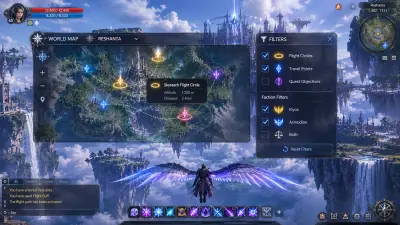
Use aerial target markers, altitude and wing or glide state to distinguish vertical information.
World and gathering ESP
Highlight ore, herbs and materials alongside NPCs, elites, bosses, quests, chests and portals.
Recording visibility
Test whether the overlay appears in your recordings. This setting does not guarantee protection from account penalties.
Saved configurations
Save your settings and load them again when you need them.
Menu and panic keys
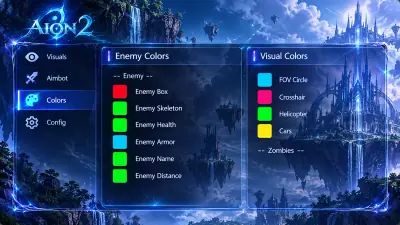
Choose separate keys for the menu and panic control. Adjust the crosshair and ESP colors in the same settings.
Faction and party controls
Distinguish faction labels in player ESP from friendly-faction, party and alliance exclusions in aim settings.
Store
Compare Aion 2 Cheats, HWID Spoofer, UGC and Skin Changer by purpose, requirements and separate license terms before checkout.
Compare the access plans alongside original product feedback.
Compare Aion 2 Cheats at $35 for 31 days or $150 lifetime
Compare Aion 2 Cheats at $35 for 31 days or $150 lifetime. Review player ESP, soft aim, flight markers and the Cloud DMA requirement.
From $35 / month
Hardware identifiers and trace cleanup
Explore disk, MAC and GPU identifier tools with trace cleanup. Compare HWID Spoofer terms and confirm current coverage before purchase.
From $50 / month
Prepare an account appeal
Organize account evidence and repeatable dispute steps with UGC. Compare licenses and understand platform decisions before purchasing.
From $35 / month
Preview cosmetics on your PC
Explore local weapon finishes, outfits and knife styles in supported titles. Check Skin Changer coverage and license terms before buying.
From $35 / month
Why us
Check Windows, security settings and Cloud DMA before choosing your Aion 2 Cheats plan. Use the catalog to compare hardware tools, account appeals and cosmetics. Each utility has a separate license.
Player ESP
Choose which names and player details to display. Box and skeleton options add a visual reference.
2D radar
View player, boss and resource markers on a separate radar. Adjust its range, zoom and faction colors.
Soft aim assist
Adjust the aim key, FOV and smoothness. Choose a target bone and check the visibility settings before saving a profile.
Flight and aerial markers
Use aerial target markers, altitude and wing or glide state to distinguish vertical information.
World and gathering ESP
Highlight ore, herbs and materials alongside NPCs, elites, bosses, quests, chests and portals.
Saved configurations
Save your settings and load them again when you need them.
PC
Steam / PURPLE
Global PC client through Steam / PURPLE; confirm the exact build.
31
31 days or lifetime
Choose $35 for 31 days or $150 lifetime. Windows 10/11, HVCI/Core Isolation, TPM and Secure Boot are required, with Cloud DMA for full functionality. Review the setup dependencies and access conditions before payment.
4
Compare our four products
Choose Aion 2 Cheats for the listed player/world overlays, flight information, radar and soft aim. A tool for hardware identifiers, an appeal workflow and a local cosmetic client address different tasks. Their catalog presence does not confirm Aion 2 compatibility.
Setup guide
Global PC client through Steam / PURPLE; confirm the exact build. Windows 10 or 11. HVCI and Core Isolation enabled. TPM and Secure Boot enabled. Cloud DMA required for full functionality on supported builds; confirm setup and additional costs.
Check the client and dependencies
Compare access terms
Follow the current setup instructions
How it works
Check the features and setup requirements before choosing a license.
4 steps
Check the client and dependencies
Confirm the global PC build, Windows security state and Cloud DMA requirements before purchase.
Compare access terms
Choose $35 for 31 days or $150 lifetime and confirm device, reset and refund conditions.
Follow the current setup instructions
Keep the order reference and use the instructions supplied for your product and build.
Review and save a configuration
Choose the information you need, save the profile and recheck compatibility after client updates.
Blog
Explore Aion 2 guides to ESP, radar, flight markers, soft aim, Cloud DMA, client updates, product scope and license terms.
Compare player labels, faction information and the 2D radar before choosing an Aion 2 overlay configuration.
Understand aerial target ESP, altitude, wing state and faction filters without confusing markers with automated movement.
Explore ore, herb, material, boss and portal markers, and distinguish information overlays from automatic farming.
FAQ
Find more answers on our FAQ page.